Everything on a computer is based on binary numbers, and that includes images.
- Images are comprised of coloured blocks called pixels. Each pixel contains a binary number which represents its colour.
- The more bits in a pixel, the greater the number of colours in the image. This is called the bit depth.
- Increasing the number of pixels and the bit depth gives a higher quality image, but requires more data to be stored, so the file size will increase.

This image is 5 pixels wide, 5 pixels deep, and has a bit depth of 1 (there is just one binary digit in each pixel).
A bit depth of 1 gives us 2 colours. This is because 21 = 2 colours.
We have used 0 to represent white and 1 to represent pink.
Bit Depth
Increasing the bit depth allows more colours to be used in an image, but increases the amount of data needing to be stored.
Each time we increase the bit depth by 1, the number of colours doubles.
Bit Depth: 2
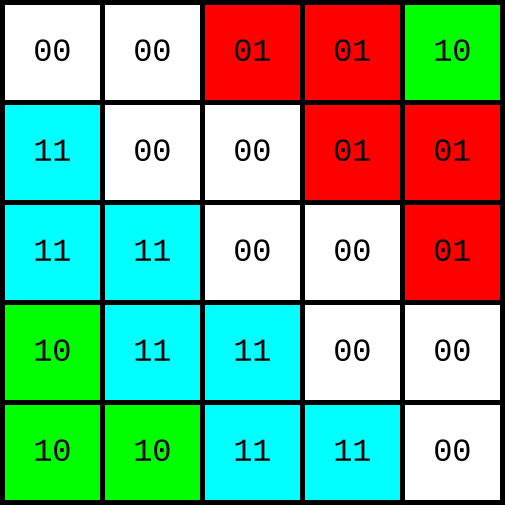
Number of colours: 22 = 4 colours
- 00 = White
- 01 = Red
- 10 = Green
- 11 = Cyan
Bit Depth: 3
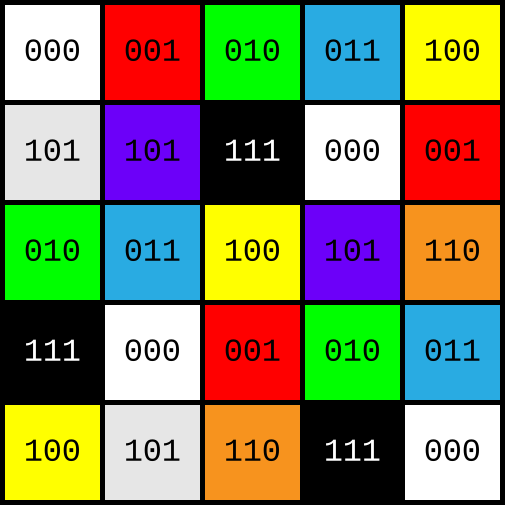
Number of colours: 23 = 8 colours
- 000 = White
- 001 = Red
- 010 = Green
- 011 = Blue
- 100 = Yellow
- 101 = Purple
- 110 = Orange
- 111 = Black
Calculating Image File Size
The formula for calculating an image's file size is:
Width x Height x Bit Depth
Width and height are the number of pixels wide and high. Bit depth is the number of bits in one pixel.
This formula will give you the file size in bits. You should convert your answer to appropriate units (bytes, kilobytes, megabytes, etc)
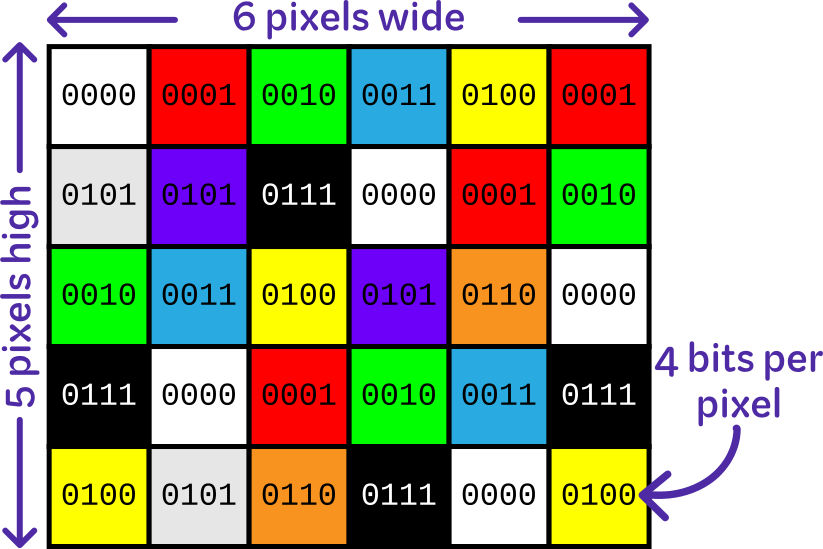
6 pixels wide x 5 pixels high x bit depth of 4 = 120 bits
Divide 120 bits by 8 to convert to bytes = 15 bytes.
Image Metadata
Metadata can be thought of as data about data.
When your computer reads image data, it just has a stream of 1s and 0s — it does not know how many bits per pixel there should be, or how many pixels high or wide the image is.
Metadata provides this information, so it can be correctly rendered.
Other metadata may include:
- The date the image was created
- Who created it
- What software was used
If the image is a photo, metadata might also include the type of camera used, lens type, and GPS coordinates of the location where the picture was taken.
If you are asked about image metadata in an exam, ensure any examples you give are relevant to image files.