A visualisation diagram is a rough design or plan that shows what a product will look like when finished. It’s often drawn by hand, or made digitally.
It is used to help people visualise the appearance of things like a website, poster, interface, or game screen It is used to help people visualise the appearance of things like a website, poster, interface, or game screen before it is actually created.
It includes:
- Images or graphics
- Important titles
- Colour and layout information
- Notes or labels
Visualisation Diagram Example
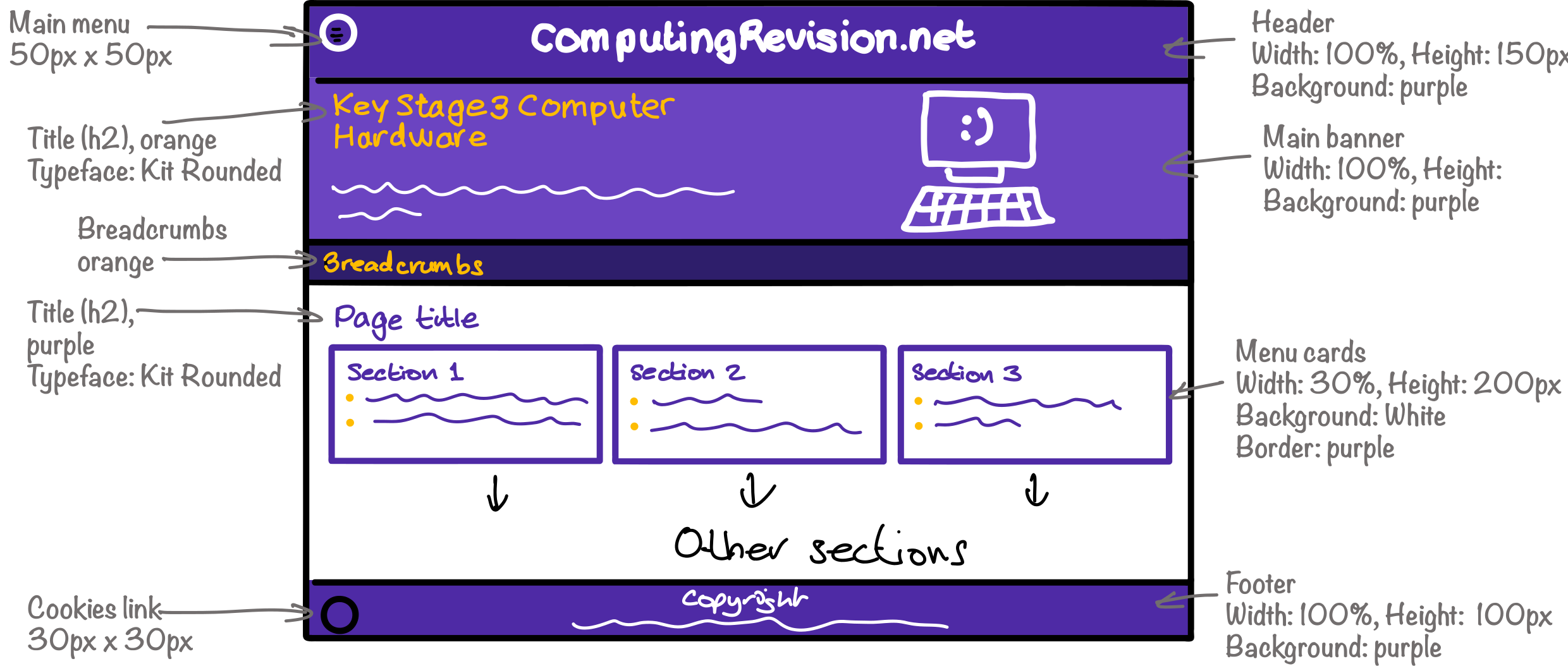
This is a visualisation diagram of the menu page for the Key Stage 3 section of this website.
Components of a Visualisation Diagram
Images

Sketches of important images on the page
Colours

The colours of elements should be shown
Sizes

The width (usually as a percentage of the screen width) and height (usually in pixels) of each element
Position

The position of each element on the screen
Typefaces

List of typefaces and where they're used on the page
Headlines

Important text should be included. Other text can be shown as squiggly lines
Pros and Cons of Mind Maps
- Conveys the look, layout, colours, and feel early into the project
- Useful for client feedback before development starts
- Quick and easy to create (hand-drawn or digital)
- Does not show functionality
- Requires some design skills
- Can be difficult to edit (but easier than final code)