What is a Wireframe?
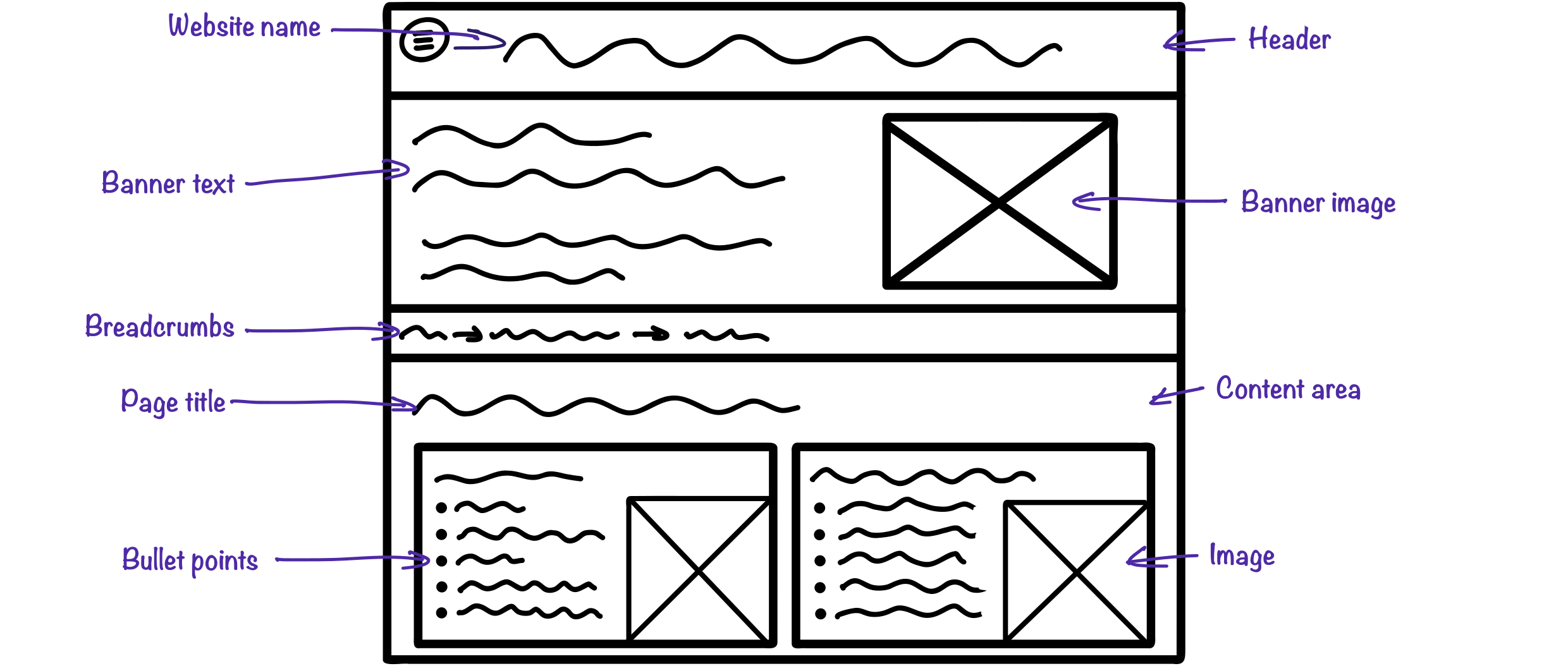
A simplified blueprint, or skeleton, of the page structure and layout.
It represents the function and content flow, not how it will look when completed.
Allows the interface designer and their clients to focus on how the project will function rather than getting distracted by how it looks
A wireframe may include sizes and positions of elements, such as images; menu items; and text, and annotations to help understanding.
A wireframe will not include any actual content, such as sketches of images; text; or colours.
Components of Wireframes
Images

A box with a cross through it shows where an image will go. The actual image should not be included
Text

Wiggly lines represent lines of text – do not write the actual text
Dropdown Menu

A list of options from which the user may select one value
Search bar

A rounded-rectangle with a search icon, used for searching content on the website or app
Text Input Box

Allows the user to enter text into a form
Radio Buttons

A list of options from which the user may select one value. Clicking a second option will deactivate the first
Checkboxes

A list of options from which the user may select multiple values
Button

A clickable shape for actions like submit or cancel. This button should be labelled
Creating Wireframes
Wireframes can be quickly sketched on paper (tip: use graph paper), or using software. There is plenty of specialist wireframing software, such as Canva, or you can use presentation software such as Microsoft PowerPoint.
Pros and Cons of Wireframes
- Focus on layout, removing distractions about looks
- Quick to draw on paper or using software
- Can be created without needing specialist software
- Simple to understand
- Lacks detail which some people may need to fully understand it