It's common to need to get information from a table based on a product number or index code. For example, scanning a barcode number should return the price or product name. A VLOOKUP is a useful way to search a column in a table for a reference code, then read across the columns to find associated data.
The syntax is a bit complex, so we'll take it step-by-step.
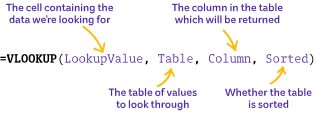
- LookupValue: The reference of the cell containing the data we are looking for.
- Table: The table containing the data to be searched. Only the first column will be searched.
- Column: The column number in the table which will be returned.
- Sorted: Use TRUE for an approximate match or FALSE for an exact match. In most uses, use FALSE.
Example
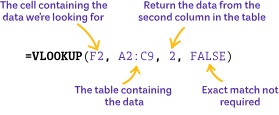
In the example above…
Let's test this
- Type the example into cell F4 and press enter
- Nothing will happen yet
- Click cell F2, type CHK3, and press enter
- The associated product name will be returned to F4
When you have tested that this works, modify the command so that the product's price (the third column) is returned to F5.